> ## Documentation Index
> Fetch the complete documentation index at: https://docs.vibeflow.ai/llms.txt
> Use this file to discover all available pages before exploring further.
# Query Node
> Fetch data from your database collections
## Overview
The **Query Node** fetches data from your database collections. Use it to retrieve user information, load products, or get any data your application needs.
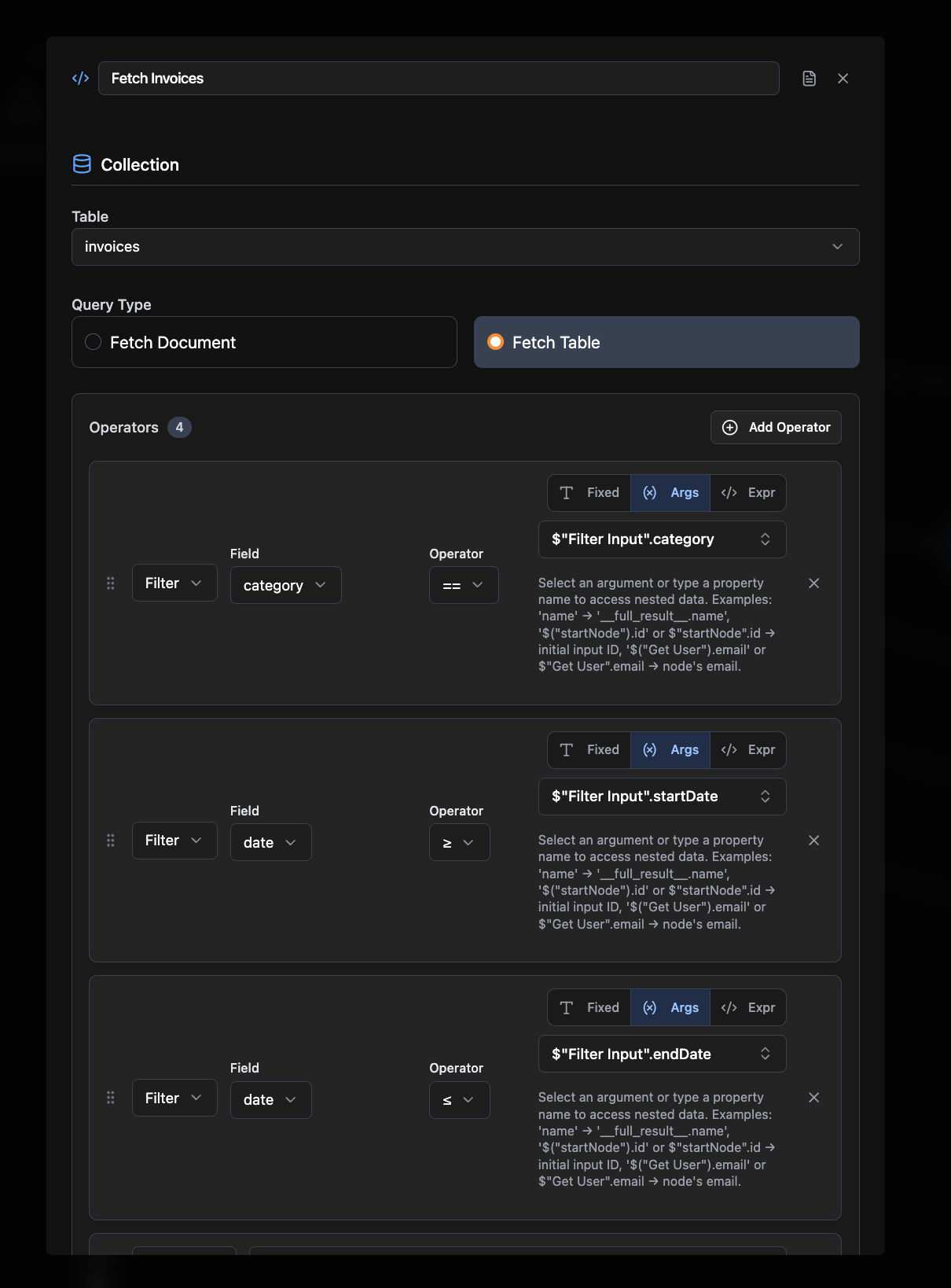 ## Required Configuration
### Collection Name
The name of the collection/table to query (e.g., `users`, `products`)
### Query Type
Select either:
* **Fetch Document:** Get a single record
* **Fetch Table:** Get multiple records
## Optional Configuration
* **Requires Auth:** Whether this node needs user authentication (default: false)
* **Operators:** Add filters, sorting, and indexing
* **Selectors:** Control how documents are returned from a Fetch Table query:
* `collect`: Return all matching documents
* `first`: Return only the first matching document
* `take`: Return a limited number of documents (specify a count)
* `paginate`: Return documents in pages (specify a page size)
* `unique`: Return a single unique document
## Connections
Query nodes **produce data** and can connect to:
* Business logic nodes (Mutation, Agent)
* Frontend Element nodes (output results)
## Common Use Cases
**Data Display.** Load user profiles, product listings, or dashboard information.
**Search & Filter.** Find specific records based on user input or criteria.
**Data Validation.** Check if records exist before processing.
**Reporting.** Fetch data for analytics, reports, or summaries.
### Example Workflows
* **User Dashboard**: Frontend Element → Query User Data → Return Results
* **Product Search**: Frontend Element → Query Products → Edit Fields (filter) → Return Results
* **Data Validation**: Frontend Element → Query Existing Records → If-Else → Mutation
## Related Nodes
Define the database schema that queries reference
Create, update, or delete data
## Required Configuration
### Collection Name
The name of the collection/table to query (e.g., `users`, `products`)
### Query Type
Select either:
* **Fetch Document:** Get a single record
* **Fetch Table:** Get multiple records
## Optional Configuration
* **Requires Auth:** Whether this node needs user authentication (default: false)
* **Operators:** Add filters, sorting, and indexing
* **Selectors:** Control how documents are returned from a Fetch Table query:
* `collect`: Return all matching documents
* `first`: Return only the first matching document
* `take`: Return a limited number of documents (specify a count)
* `paginate`: Return documents in pages (specify a page size)
* `unique`: Return a single unique document
## Connections
Query nodes **produce data** and can connect to:
* Business logic nodes (Mutation, Agent)
* Frontend Element nodes (output results)
## Common Use Cases
**Data Display.** Load user profiles, product listings, or dashboard information.
**Search & Filter.** Find specific records based on user input or criteria.
**Data Validation.** Check if records exist before processing.
**Reporting.** Fetch data for analytics, reports, or summaries.
### Example Workflows
* **User Dashboard**: Frontend Element → Query User Data → Return Results
* **Product Search**: Frontend Element → Query Products → Edit Fields (filter) → Return Results
* **Data Validation**: Frontend Element → Query Existing Records → If-Else → Mutation
## Related Nodes
Define the database schema that queries reference
Create, update, or delete data