

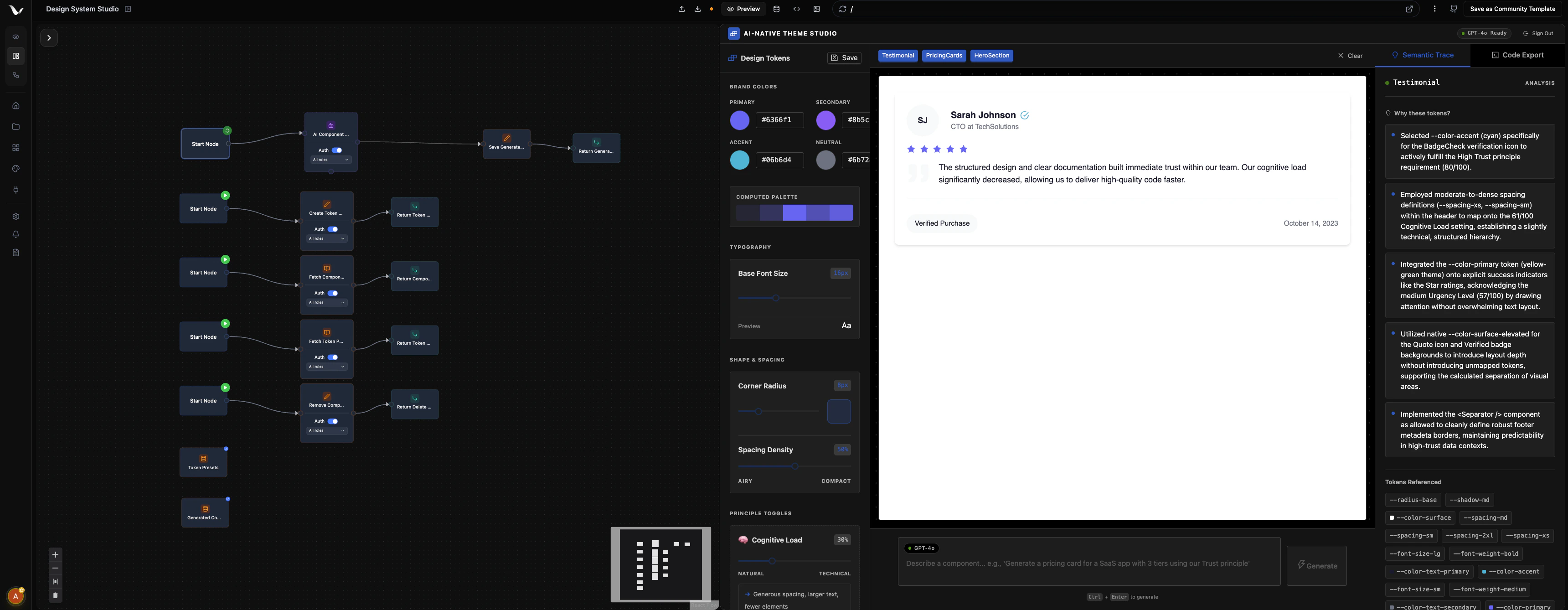
What is VibeFlow?
VibeFlow is an AI-powered workflow platform with a built-in database and optional frontend. Describe what you want to build, and VibeFlow’s AI agent creates real TypeScript workflows, complete with APIs, automations, and integrations. You can also build and refine workflows visually by connecting nodes in our editor. Perfect for developers, founders, and teams who want to build automations, internal tools, and full-stack applications faster.AI-Powered Creation
Describe your workflow in plain language and let the AI agent build it for you
Build Visually
Drag and drop nodes to create backend logic. Real TypeScript runs underneath.
Deploy Instantly
Your backend automatically syncs with GitHub and deploys to production
Scale Easily
Built on robust infrastructure that grows with your application
How It Works
Option 1: Prompt Your Workflow Into Existence
Describe what you need in natural language. VibeFlow’s AI agent automatically creates your entire workflow, complete with database schema, API endpoints, and business logic. You can then refine it in the visual editor or continue with chat-based modifications. Choose between two modes:- Full Stack: Generates a complete project with workflows, database, and a frontend UI
- Workflow Only: Generates just the backend workflows and database, perfect for automations, APIs, and integrations
Option 2: Add a Frontend
Need a UI? Provide a URL to clone, or import your own frontend project from GitHub. VibeFlow connects your frontend to your workflows automatically.Option 3: Build Manually in the Editor
Prefer hands-on control? Build your workflows step-by-step using the visual editor:- Data nodes: Store and manage your application data
- AI nodes: Add intelligent processing and decision-making
- Transform nodes: Process and reshape your data
- Trigger nodes: Respond to user actions and events
Deploy Automatically
VibeFlow generates production-ready TypeScript code and integrates with your GitHub workflow. Your frontend connects seamlessly to powerful backend APIs that handle everything your app needs.Key Features
Visual Workflow Builder
Visual Workflow Builder
Create backend logic by connecting visual nodes. The AI builds real TypeScript code. Drag, drop, and configure.
GitHub Integration
GitHub Integration
Automatic synchronization with your repository. All changes are tracked and version controlled.
AI Agent Nodes
AI Agent Nodes
Add AI-powered processing to your workflows. Connect to LLMs for intelligent automation, content generation, and decision-making.
15+ Integrations
15+ Integrations
Connect to Stripe, Slack, Twilio, Notion, Zoom, ElevenLabs, LinkedIn, and more, all configurable as drag-and-drop nodes.
Custom Domains & Design Systems
Custom Domains & Design Systems
Deploy your app on a custom domain and use built-in design systems to keep your UI consistent.
Frequently Asked Questions
What database and language does VibeFlow use?
What database and language does VibeFlow use?
VibeFlow is built with TypeScript and uses Convex as our real-time database solution, providing automatic syncing and powerful querying capabilities.
What integrations are supported?
What integrations are supported?
VibeFlow supports AI Agents, HTTP Requests, Stripe payments, Email (Resend), Webhooks, Cron jobs, MCP tools, and 15+ third-party integrations including Slack, Twilio, LinkedIn, Notion, Zoom, ElevenLabs, and more.
Do you support mobile apps?
Do you support mobile apps?
For now, VibeFlow focuses exclusively on web applications. Mobile app
support is not currently available.
Can I migrate my existing data?
Can I migrate my existing data?
Yes! If you’re a business with an existing project and data, we can help
migrate your data to VibeFlow. Simply contact us to discuss your migration
needs.
Can I use my own frontend?
Can I use my own frontend?
Absolutely! You can bring your own frontend and connect it to VibeFlow’s backend workflows. Our system is designed to work with any frontend framework or platform.
Getting Started
Ready to build your first workflow?Quick Start Guide
Get your first workflow running in 5 minutes
Core Concepts
Understand workflows, nodes, and how everything connects