

Overview
The If-Else Node is your workflow’s decision maker. It evaluates conditions and routes your flow down different paths based on whether those conditions are true or false. Perfect for user validation, permission checks, API response handling, and any scenario where your workflow needs to make smart decisions.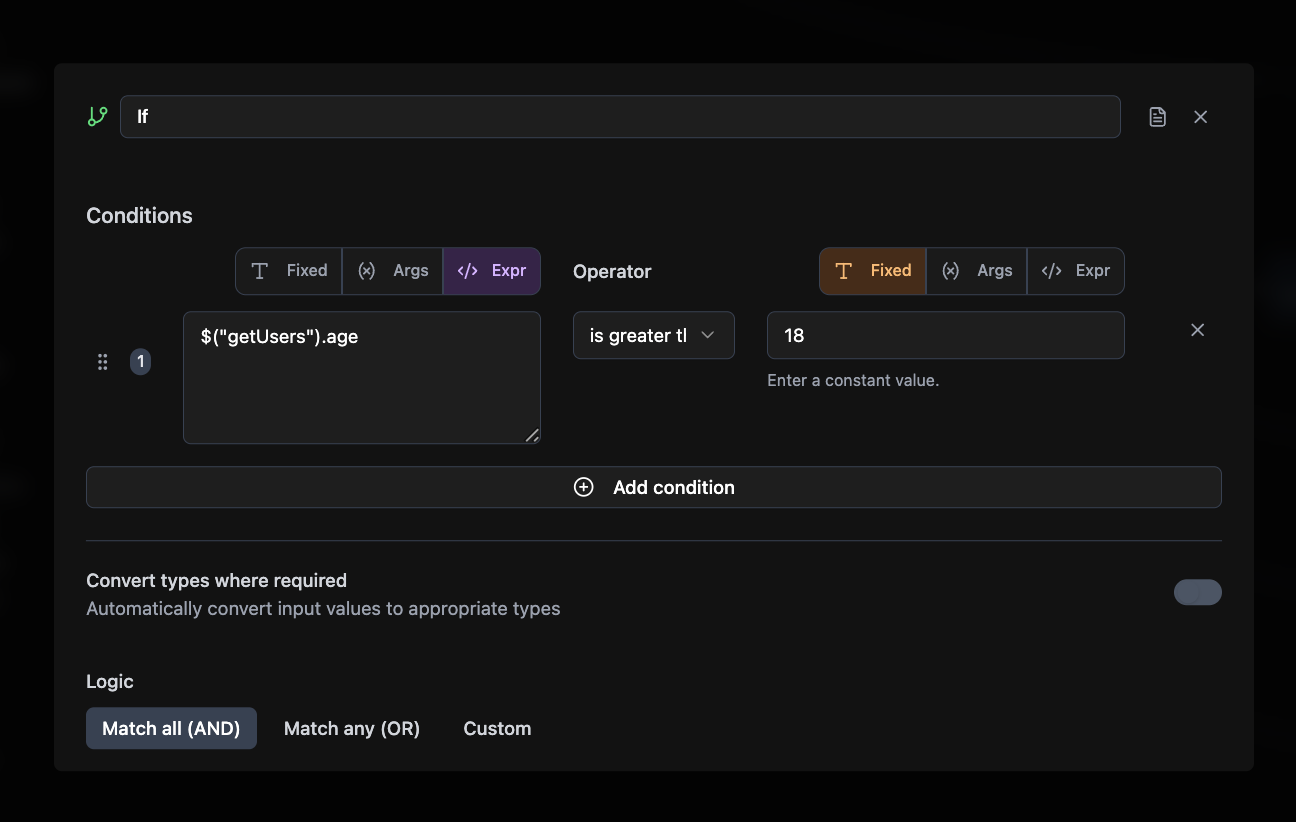
Required Configuration
- Label: Display name for the node
- Conditions: The logic rules to evaluate (at least one required)
- Left Value: What you’re checking (from previous node or fixed value)
- Operator: How to compare: equals, greater_than, contains, empty, exists, etc.
- Right Value: What to compare against (when applicable)
- Logic Mode: How to combine multiple conditions
- All: Every condition must be true (AND logic)
- Any: At least one condition must be true (OR logic)
- Custom: Write your own logic like “(1 AND 2) OR 3”
Optional Configuration
- Requires Auth: Whether this node needs user authentication (default: false)
- Convert Types: Auto-convert strings to numbers/booleans for comparison (default: true)
Connections
If-Else nodes connect to any node type and create two output paths: Input from: Frontend Elements, Query/Mutation nodes, Agent nodes, other If-Else nodes Output to:- True branch: When conditions pass
- False branch: When conditions fail
- Query nodes (fetch data based on conditions)
- Mutation nodes (save different data per branch)
- Agent nodes (AI processing based on conditions)
- HTTP Request nodes (different API calls per branch)
- Email/Resend nodes (send notifications based on conditions)
- Return nodes (end workflow with different outputs)
- Edit Fields nodes (transform data differently per branch)
- Other If-Else nodes (nested conditional logic)
Common Use Cases
User Validation. Age verification, email format checks, required field validation. Permission Routing. Admin vs user flows, subscription tiers, feature flags. API Response Handling. Success vs error responses, status code routing. Error Handling. Network failures, invalid data recovery, user-friendly fallbacks.Example Workflows
- Form Validation: Frontend Form → If-Else (age ≥ 18) → True: Create Account / False: Show Error
- User Permissions: Login → If-Else (role = admin) → True: Admin Panel / False: User Dashboard
- Data Validation: API Call → If-Else (status = success) → True: Process Data / False: Show Error
Related Nodes
Frontend Element Node
Collect user input to evaluate
Query Node
Fetch data for condition checking
Agent Node
Use AI to make complex decisions
Mutation Node
Store results from either branch
Edit Fields Node
Transform data differently per branch
Email Node
Send notifications based on conditions